What Is Google Analytics? Basic GA User Guide
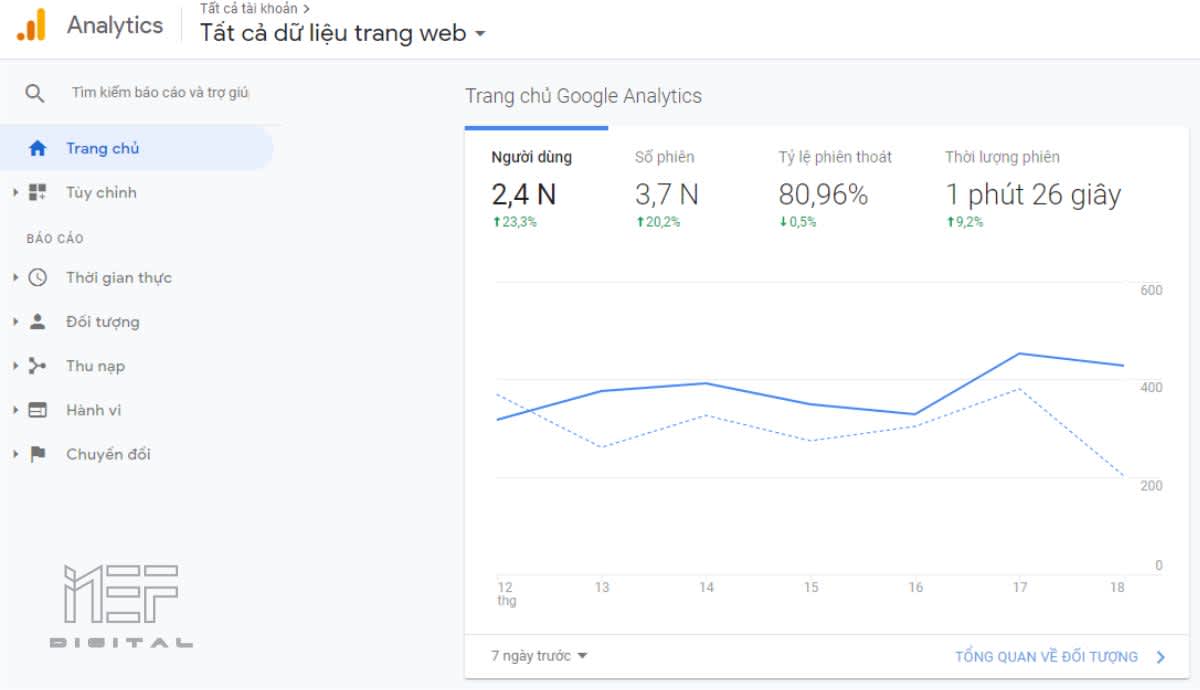 Have you ever heard of Google Analytics? If your work involves online advertising, you are definitely familiar with it. It is an essential tool that supports website operations.
So, do you know its features and how to use it? The article below will answer all your questions related to Google Analytics.
Introduction to Google Analytics
The section below explains the concept and benefits of Google Analytics. This is the foundational knowledge you need to grasp first when exploring this field.
What is Google Analytics?
Google Analytics is an online tool designed for marketers and advertisers. Through it, they can track metrics related to website activities. Google Analytics always ensures that the website data it provides is accurate. From there, users can gain an overview of their website's condition to implement timely solutions during the website optimization process. Google Analytics reports website traffic, average session duration, and user bounce rate. In addition, Google Analytics provides many other metrics, helping you clearly understand user browsing behavior. Google Analytics is a completely free tool; you can easily register and use it as long as you have your own website. To date, Google Analytics has been supporting data analysis for around 1 billion websites worldwide.Google Analytics Structure
Google Analytics is currently divided into 3 main parts as follows:Account
This is not your Google account, but the highest-level entity in Google Analytics that you can create. Each account can contain up to 50 properties. However, few people need that many properties. You should organize your properties in the simplest and most effective way.Property
A property is a specific website or a mobile application. The tracking ID triggers data at the property level it represents. However, properties can be transferred between accounts.View
A view is your access point to reports. Views can be filtered and processed in specific ways. One property can contain up to 25 views.Key Benefits of GA
Google Analytics helps you answer the questions you will have when owning your own website. Specifically, its uses include: - How many people have visited your website? - Where do those visitors come from? - Is your website mobile-friendly? - Which sources does your traffic come from? - Which marketing tactics generate the highest website traffic? - Which parts of the website attract users and receive the most visits? - How many website visitors become potential leads? How to optimize website speed? - These are just a few typical questions among a wide range of user inquiries that Google Analytics can answer for you. So how do you install and use the Google Analytics tool? Please read the following section for the most accurate usage guide - to help manage and optimize your website more effectively.Basic GA User Guide
You can install GA in 4 steps and learn about its features. From there, you can easily put it to use. #### 4 Steps to Install Google AnalyticsStep 1: Create an account
The first requirement is that you must have your own website. If the tool is already installed on your website, you can go straight to logging in. If not, the first thing you need to do is sign up for a Google Analytics account.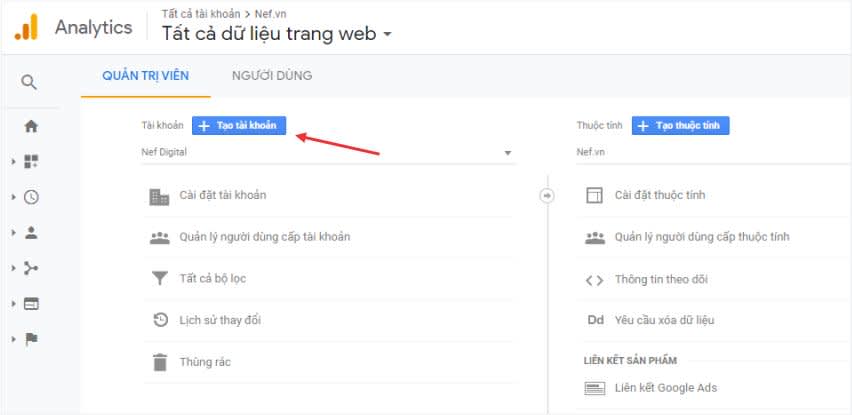 Visit the link http://www.google.com.vn/analytics/ and log in with your Gmail account. Then, click the Create Account button and click Sign Up on the page that appears.
Step 2: Set up your account
In this step, you need to fill in information about the account name and the website you want to track. Specifically, you can freely choose the account name, enter your website URL and name, and select the relevant industry category for your website. You also need to set the reporting time zone to match your location. After completing the information, Google will direct you to get your Tracking ID. Before that, however, you must read its terms and conditions and click Accept to finish this step. Afterward, you will be moved to the step of receiving your Tracking ID.Step 3: Get the Tracking ID and paste it onto necessary pages
Google's tracking ID is a JavaScript code snippet provided to users. This code exists to collect data from the website and send it to Google Analytics for statistical analysis. Your task is to copy this code snippet and paste it onto the pages you want to track on your website, or use it with Google Tag Manager. The place to paste it on your web pages is in the HTML code, right before the </head> tag.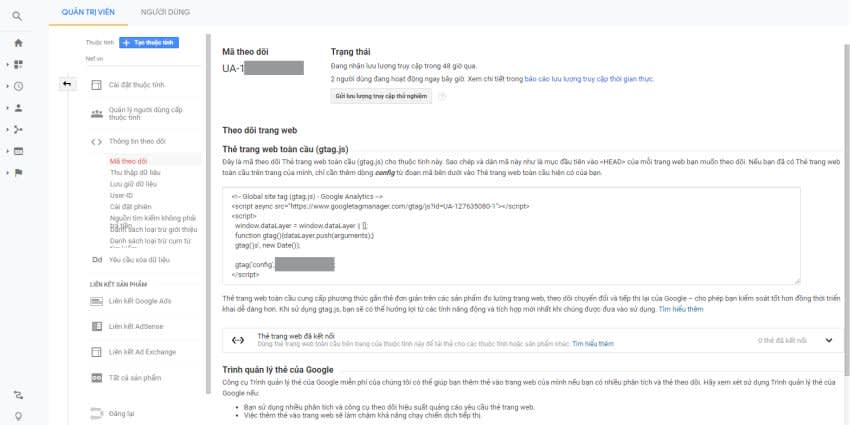
Step 4: Set up Goals
A very important task after configuring basic information is setting up Goals. You can find the Goals section under the Admin link at the top of the Google Analytics page. Then, click on Goals under your website view. Setting up Goals helps Google Analytics understand what it needs to measure on your website. From there, Google Analytics extracts data according to your needs. The steps you need to take in the Goals setup section are: - Click "New Goal" - Select "Custom" - Click "Continue" - Name the goal as you wish - Select "Destination" - Enter the webpage URL into the Destination field - Click Save - You can create up to 20 goals, following the steps above for each goal. Examples of goals you can set include email list sign-ups, lead form submissions, completed purchases, etc. Depending on the purpose of your website, you can establish different goals. Recommended tool: Google Search Console5 Key Features of Google Analytics You Need to Know
Google Analytics has 5 main features as follows. #### Real-Time The Real-Time feature shows you the number of visitors currently on your website. In addition, this feature retrieves the following information: - Which channels visitors come from - Which pages on the website visitors are viewing - The geographic location of visitors - Keywords displayed to customers - Which conversions are taking place - Referring URLs - Monitoring real-time data helps you know whether your website is operating stably, allowing you to take timely action. #### Audience Audience provides detailed information about your visitors at any given time. These metrics include: - Users: The total number of people who visited within a specific time period - New Users: The number of first-time visitors to the website within a specific time period - Sessions: Visit sessions; typically, 30 minutes of inactivity counts as one session - Sessions per User: The average number of sessions per user - Pageviews: The total number of pages viewed by visitors, including repeated views - Pages/Session: The average number of pages viewed during a single session - Average Session Duration: The average length of a visit session - Bounce Rate: The percentage of visitors who leave the site after viewing only one page without interacting with any content - Language - Geographic location - Browser (Chrome, Firefox, Coc Coc, etc.) - Mobile and desktop operating systems - User flow on the website, including which content they start and end with Overall, Audience helps you visualize and segment customers by common characteristics. From there, you can devise plans to optimize user experience, improve metrics, build trust with Google, and boost your website's ranking.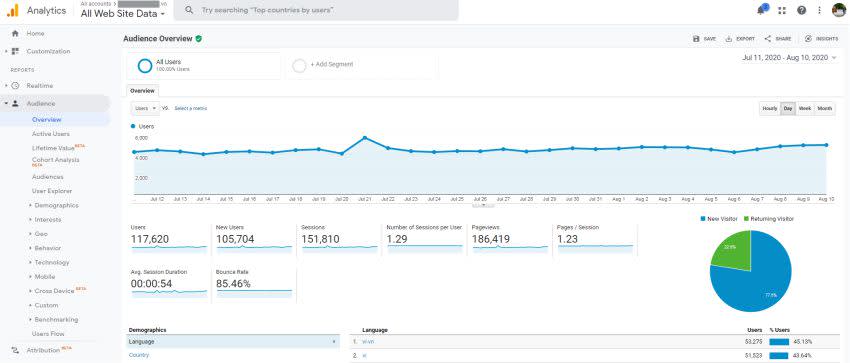 #### Acquisition
Acquisition gives you an overview of traffic from online marketing channels. There are 6 main channels:
- Organic Search: Search traffic from Google and other search engines
- Paid Search: Traffic from paid advertising campaigns
- Direct: Traffic from users typing your website URL directly
- Social: Content shared on social networks that directs users to your website
- Referral: Traffic directed from other websites
- Other: Sources not yet categorized by Google, such as Zalo
- Traffic from every channel has value. However, Organic Search is the metric you should pay close attention to if you are running an SEO campaign.
#### Behavior
Behavior helps website administrators better understand customer actions on the site. This includes:
- Most viewed content: Pages, titles, or keywords
- Time on page
- Exit rate
- Page load speed: The time it takes for users to load web content across pages
- Site Search (what customers look for using your website's search function)
#### Conversion
What businesses care about most are sales (purchases), customer data (leads), phone calls, etc.—in general, conversion values. For a marketing campaign, to measure effectiveness accurately, you need to define these metrics.
By setting up tracking based on customer actions such as filling out forms, making phone calls, or completing purchases, Google Analytics tells you how many customers converted during the campaign. From there, you can measure the effectiveness of your advertising campaigns.
For SEO professionals, mastering Google Analytics is a must. This tool not only helps you optimize your website's SEO for search engines but also helps you maximize profits from customers visiting your website.
Above is the information about Google Analytics that we wanted to share with you. Hopefully, this article has provided you with useful knowledge so you can apply it in the most effective way.