What is Google Search Console? How to Use Google Search Console
What is Google Search Console?
Google Search Console is a tool built and developed by Google to support website administration. It is considered the “golden key” for webmasters and SEO specialists, offering unique and practical features that make website management easier and more convenient. So, what does the term Webmaster in Google Webmaster Tools mean?

What is a Webmaster?
 A Webmaster, also known as a Website Administrator, is the person responsible for managing a website—handling everything from registration and maintenance to resolving any issues that arise on the site—ensuring the website operates as smoothly and effectively as possible.
What is Search Console?
 Google Search Console, also known as Google Webmaster Tools, is a free support tool for webmasters. It provides statistics on links pointing to your website as well as the keywords users are likely to search to access your site, saving you time so you can focus on optimizing and refining your website.
Access Google Search Console
It can be said that Google Search Console is the ideal “companion” for webmasters and SEO professionals thanks to the unique features it offers.
How to Use Google Webmaster Tools
Below is a guide to using some of the basic features of Google Webmaster Tools:
- Site messages
- Search Traffic
- Analyzing CTR with Google Search Console
- Who links the most
- Internal links
- Mobile Usability
- Search Appearance
- Google index
- Sitemaps
- Google Webmaster Tools – What are Site messages?
Google Webmaster Tools – What are Site messages?
 When your website encounters issues such as malware infections, unnatural links pointing to your site, or an unexpected spike in crawl errors, this tool sends notifications to you via site messages.
How to set it up:
- Step 1: Click the gear icon on any page in Google Search Console.
- Step 2: Click Search Console Preferences.
- Step 3: Check the box to enable email notifications from Search Console and click Save.
Google Webmaster Tools – What is Search Traffic?
#### Search Queries Reports
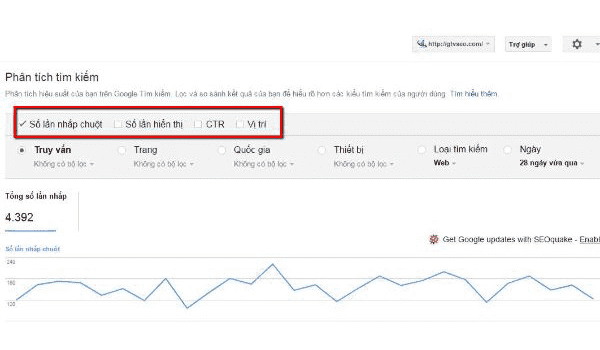 This feature is integrated within Search Analytics. With this tool, users can summarize important metrics completely free of charge, including: Impressions, Clicks, CTR (Click-Through Rate), Rankings, and more.
#### Mobile vs. Web
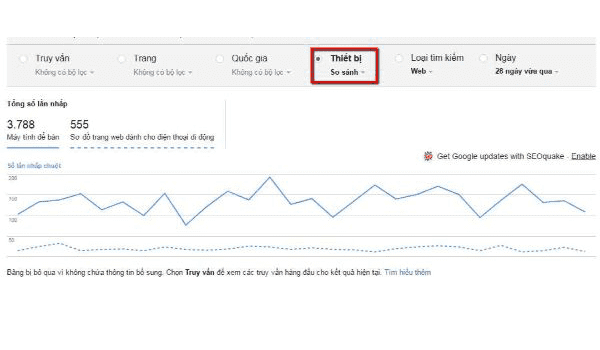 This feature helps you check whether users are accessing your website via smartphones or desktop computers.
#### Analyzing CTR with Google Search Console
 <h5>Advantages</h5>
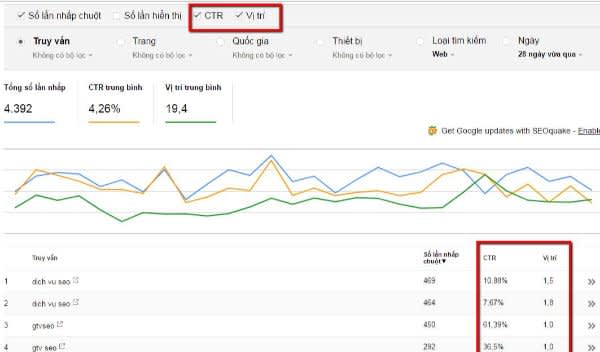
- Users can use Google Search Console to pull CTR (click-through rate) analysis reports. The resulting insights deliver many great benefits.
- Helps users understand the relationship between ranking position and clicks.
- By combining it with Google Keyword Planner, this tool helps users better understand relevant SERPs through monthly keyword search volume reports, enabling them to adjust SEO or AdWords strategies effectively.
- By reporting ROI metrics, this tool effectively supports measuring the marketing performance of your website.
- Direct control and measurement: By combining SEO CTR metrics with Google AdWords, users can calculate total CTR and develop the most suitable strategy.
<h5>Limitations of the Google Search Queries Report</h5>
- Does not provide engagement metrics or conversion rates.
- Does not offer reports on “metropolitan area” or “time of day” like Google Analytics does.
- Does not display all keywords.
- Historical data only goes back 3 months.
<h5>Notes for the Google Search Queries Report:</h5>
- Image searches generate more impressions than standard content searches.
- Displaying multiple listings for a single keyword will significantly reduce CTR.
- CTR varies depending on each specific case.
- The collected metrics are not absolute.
- Links to your site:
 This feature allows users to check and compile information about external links pointing to their website.
#### Google Webmaster Tools – What is Who links the most?
 - Your most linked content: With this feature, you receive reports on which content on your website has the most backlinks pointing to it.
- How your data is linked: This section contains over 200 anchor texts, showing you which anchor texts are used in backlinks pointing to your website. Google Webmaster Tools – What are Internal links?
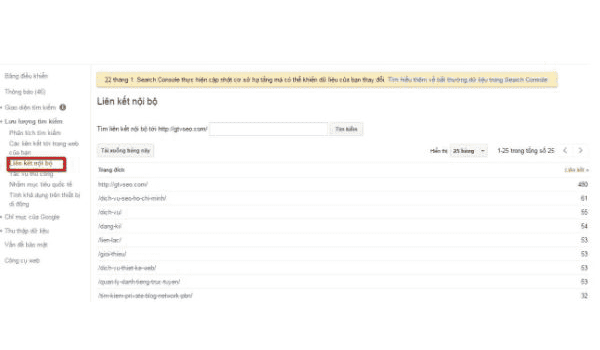
Internal links is where Google Webmaster Tools tracks and updates internal links within your website.
#### Google Webmaster Tools – What is Mobile Usability?
In Mobile Usability, users can check whether their website’s mobile interface is experiencing errors related to:
- Font size
- Viewport width
- Viewport configuration
- Content sizing
- Touch element / link spacing…
#### Google Webmaster Tools – What is Search Appearance?
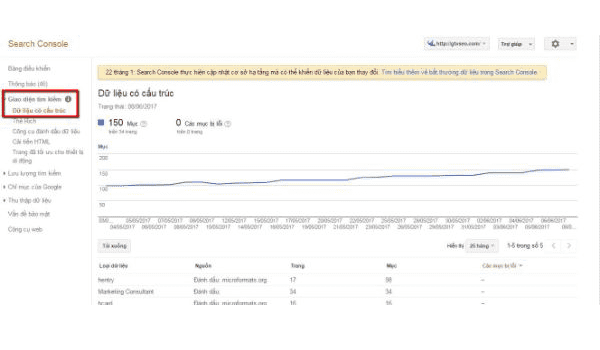 With this feature, users can improve how their website results appear on Google Search.
- Structured Data
Structured Data allows users to compile statistics on structured data across the entire website and by data type, thereby increasing clicks to their website.
- Data Highlighter
Data Highlighter informs Google about what schema.org markup to apply, helping display rich website data in search results.
- HTML Improvements
This tool helps users improve the appearance of their SERP listings, solving issues related to keyword optimization and duplicate content.
#### Google Webmaster Tools – What is Google Index?
- Fetch as Google
 Fetch as Google is a feature that allows you to submit URLs to Google for indexing, as well as view Google’s assessment of your page.
Fetch as Google also includes another special feature for evaluating SEO friendliness. Users simply click Fetch and Render. If any issues are flagged, users can improve their content to make it more Google-friendly.
#### Google Webmaster Tools – What are Sitemaps?
 This section reports any Sitemap errors occurring on your website. You should check this area regularly to promptly detect and resolve any issues that arise.
What is the Role of Google Webmaster Tools?
Google Webmaster Tools plays a particularly important role, especially for SEO specialists and website administrators.
- Helps administrators stay fully informed about their website’s status so it can operate as efficiently and smoothly as possible.
- Serves as an essential tool for optimizing your website and improving its rankings on search engine results pages.
- Helps build a professional, distinctive website that leaves a strong impression on customers.
- Enables timely detection and resolution when technical issues occur.
What are the Benefits of Using Google Webmaster Tools?
 Google Webmaster Tools is always a top priority. Why? Because this tool is completely free to use and packed with modern, powerful features.
These features help administrators save time while reducing website management costs, allowing them to focus on optimizing and perfecting the website.
Leveraging Google Webmaster Tools for website care and administration is essential to creating a professional, impressive, and high-performing website without spending excessive time, manpower, or budget.